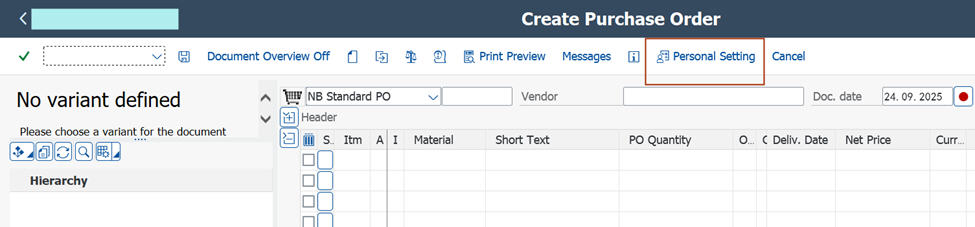
ME21N Document Overview Default

How to Set Document Overview Default Behavior in ME21N?

In SAP transaction ME21N, the Document Overview on/off can be configured to either appear or remain hidden by default based on your personal settings. Here's how to control its default visibility:

To Disable Document Overview by Default:

  1. Open ME21N.
  2. Click on “Document Overview Off” to hide the pane.
  3. Go to “Personal Settings” (usually via the top-right gear icon or menu).
  4. Save the settings without making any changes.
Exit and reopen ME21N to confirm that the Document Overview is now hidden by default.

To Enable Document Overview by Default:

  1. Open ME21N.
  2. Click on “Document Overview On” to display the pane.
  3. Navigate to “Personal Settings”.
  4. Save the settings without modifying anything.
  5. Reopen ME21N to verify that the Document Overview now appears by default.
This behavior is controlled by how ME21N stores your last-used layout in conjunction with your saved personal settings. No additional configuration or authorization is required.

ME21N Document Overview Default

SAP MM Tips


See also
Purchasing Customizing

Get help for your SAP MM problems
SAP MM Forums - Do you have a SAP MM Question?

SAP MM Books
SAP Material Management Certification, Interview and Configuration Reference Books

SAP Material Management Tips
SAP MM Configuration Tips and Materials Management

Main Index
SAP ERP Modules, Basis, ABAP and Other IMG Stuff

All the site contents are Copyright © www.erpgreat.com and the content authors. All rights reserved.
All product names are trademarks of their respective companies.  The site www.erpgreat.com is in no way affiliated with SAP AG.
Every effort is made to ensure the content integrity.  Information used on this site is at your own risk.
 The content on this site may not be reproduced or redistributed without the express written permission of
www.erpgreat.com or the content authors.